Ambient Weather
Ambient Weather WS-2902D custom server setup
The WS-2902D can send its readings to a server of your own, beside its uploads to AmbientWeather.net and Weather Underground. Its Customized setting is on the console's own settings page. These steps, from Ambient Weather's manual, point it at Dank Weather.
Your setup key
The setup key goes in the path, and adds the station to your Dank Weather account with its first reading. Make an account or sign in and this page fills yours in.
Steps
Put the console in Wi-Fi setup mode
For about five minutes after it's plugged in, the console broadcasts its own Wi-Fi network, AMBWeatherPro-XXXXXX. After that, hold WIND / + and PRESSURE / − together for 5 to 10 seconds to turn it back on.
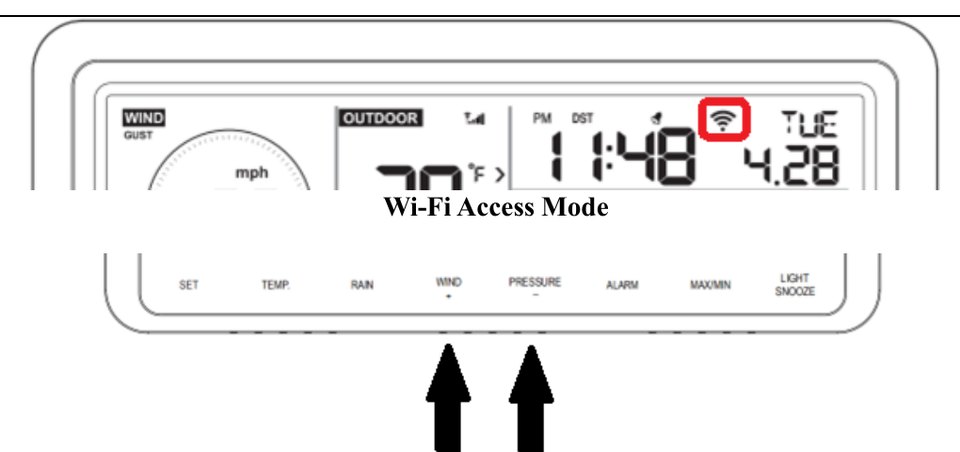
Hold these two buttons. Open the console's settings page
From a phone or computer, join AMBWeatherPro-XXXXXX (it has no internet; that's expected) and go to
http://192.168.4.1in a browser.If the console isn't on your Wi-Fi yet, enter your 2.4 GHz network under Wi-Fi Network (Scan Router lists them) and click Apply.
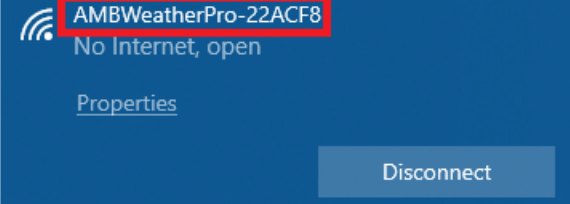
The console's network. Yours ends in different characters. Fill in Customized
Find the Customized area of the settings page. Choose Enable, fill in the fields as below and click Save.
- Customized
- Enable
- Protocol Type Same As
- AmbientWeather
- Server IP / Hostname
- api.dankweather.com
- Path
- /aw?
- Port
- 80
- Upload Interval
- 16Seconds. 16 is the shortest most stations allow.
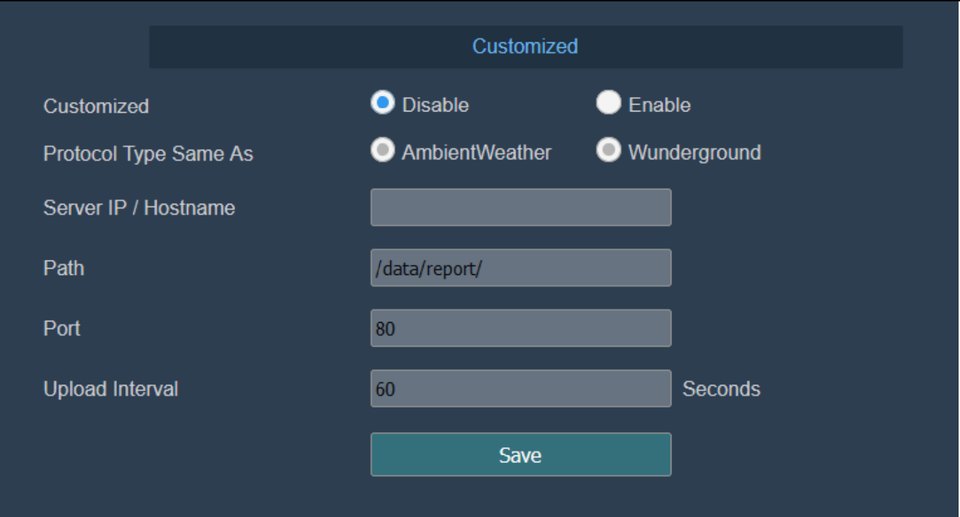
Customized, before it's filled in. Look for it under Your stations
Without a setup key the station still sends data, but it isn't added to your account: make a setup key above and use the new path, or email [email protected] to link it.
- Enter the path exactly as shown, ending in the
?. - Use port 80. Ambient stations can't send to a custom server over HTTPS.
- Dank Weather keeps every reading and recommends the shortest interval your station allows, but the interval is up to you.
- Screens from Ambient Weather's WS-2902D manual.
Questions
- How often can it send?
- Set the shortest interval it allows: 16 seconds on most Ambient Weather stations.
- Does it still send to AmbientWeather.net?
- Yes. Customized is an upload of its own: AmbientWeather.net and Weather Underground carry on as before.
- Why port 80 and not HTTPS?
- Ambient Weather's consoles send to a custom server over plain HTTP only, on port 80.
- Can I pick the Wunderground protocol instead?
- Dank Weather reads it too, but Ambient Weather's own protocol carries more of the station's sensors, so pick that one.
Why send it to Dank Weather
- Every reading is kept and shows up live on your station's page.
- History charts of temperature, wind, rain, pressure and air quality.
- A forecast at your station, and in the lower 48, the next two hours of rain from live radar.
- Your station in Home Assistant, with the Dank Weather integration.