Ambient Weather
Ambient Weather WS-2902 custom server setup
The WS-2902 (and the 2902A, B and C) can send its readings to a server of your own, beside its uploads to AmbientWeather.net and Weather Underground. Its Customized setting is in the awnet app. These steps, from Ambient Weather's manual, point it at Dank Weather.
Your setup key
The setup key goes in the path, and adds the station to your Dank Weather account with its first reading. Make an account or sign in and this page fills yours in.
Steps
Connect the console to Wi-Fi in awnet
Plug the console into its power adapter (its Wi-Fi doesn't run on batteries) and install the awnet app from the App Store or Google Play. With your phone on your 2.4 GHz Wi-Fi, open awnet, tap Add Device and pick your station.
If the console's Wi-Fi icon isn't flashing fast, hold WIND + and PRESSURE − for about five seconds (the first WS-2902's manual says RAIN and ALARM). When awnet asks, join the console's own network, AMBWeather-WIFIxxxx, in your phone's Wi-Fi settings, then go back to awnet to finish.
Already on Wi-Fi? Skip to the next step.
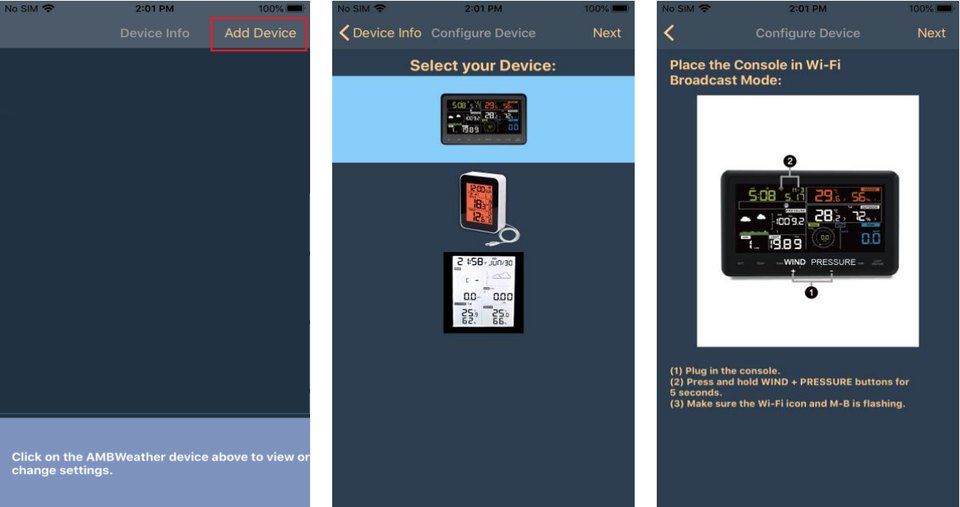
Add Device, picking the station, and the buttons that start Wi-Fi setup. Open the Customized screen
In awnet's device list, tap your station. Tap Next past the upload screens (AmbientWeather.net, Wunderground, Weathercloud) until you reach Customized.
Enter Dank Weather's settings
Tap Enable, fill in the fields as below and tap Save.
- Customized
- Enable
- Protocol Type Same As
- Ambient Weather
- Server IP / Hostname
- api.dankweather.com
- Path
- /aw?
- Port
- 80
- Upload Interval
- 16Seconds. 16 is the shortest the WS-2902 allows.
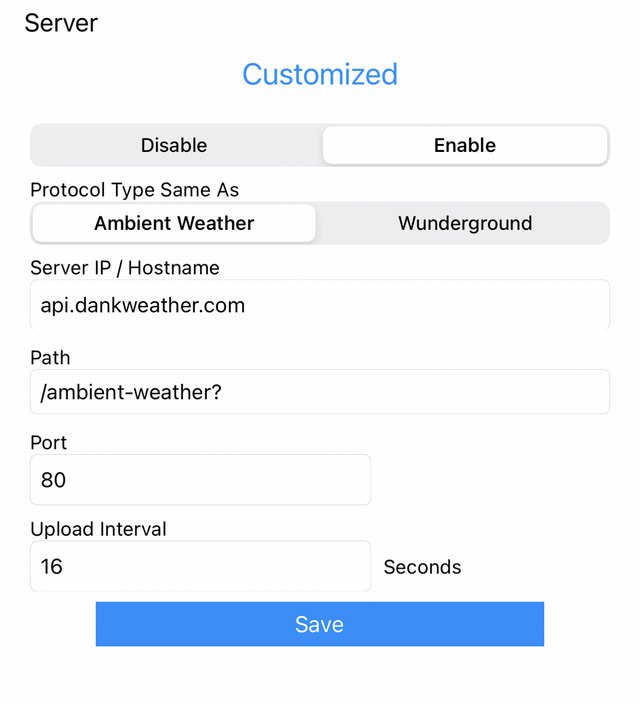
awnet's Customized screen, filled in with the longer path, /ambient-weather?, which works too. Look for it under Your stations
Without a setup key the station still sends data, but it isn't added to your account: make a setup key above and use the new path, or email [email protected] to link it.
- Enter the path exactly as shown, ending in the
?. - Use port 80. Ambient stations can't send to a custom server over HTTPS.
- Dank Weather keeps every reading and recommends the shortest interval your station allows, but the interval is up to you.
- Screens from the awnet app and Ambient Weather's WS-2902C manual.
Questions
- How often can it send?
- As often as every 16 seconds, the shortest the WS-2902 allows.
- Does it still send to AmbientWeather.net?
- Yes. Customized is an upload of its own: AmbientWeather.net and Weather Underground carry on as before.
- Why port 80 and not HTTPS?
- Ambient Weather's consoles send to a custom server over plain HTTP only, on port 80.
- Can I pick the Wunderground protocol instead?
- Dank Weather reads it too, but Ambient Weather's own protocol carries more of the station's sensors, so pick that one.
Why send it to Dank Weather
- Every reading is kept and shows up live on your station's page.
- History charts of temperature, wind, rain, pressure and air quality.
- A forecast at your station, and in the lower 48, the next two hours of rain from live radar.
- Your station in Home Assistant, with the Dank Weather integration.